Drawing Foamies in Sketchup: Tips & Tricks

Bet you thought I was gonna write about snow. It was cold, I’m over it.

I have been putting some serious time into Sketchup for a new project. Since nobody on RC Groups reads this blog I think I can get away with posting pics of it here as examples before I mention it over there. Ok, on with the tips:

Make components of everything symmetrical. I do half the wing, half the elevator, half of the sides etc. Don’t duplicate anything, just make a component and copy it. Here you can see a shot of the new project and what you see is exactly 1 of each component in the drawing. This is the best way to cut down on your workload.
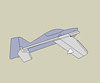
One of Each Component

If something would be more convenient as a whole object, say a whole wing or the elevator use make a group out of them. This way they can be selected and manipulated as if they were one component without the duplicated geometry penalty. The Outliner is your friend here. You can rename groups and rearrange the group hierarchy in the outliner.

Sketchup makes it really easy to extrude things into 3D. Resist the temptation to make all your parts 3D. In the long run its just so much easier to manipulate things in a 2D plane than in 3D. It will save you a lot of work. You can place everything in 3D of course but you have to remember to keep things the right distance apart (3mm or 6mm depending on the depron or foam thickness your shooting for). You run into so many problems making geometry changes in 3D that its just safer to keep everything in 2D. If you have something complicated that would be easier to work out if everything were in 3d try making a copy of all the components and use the “Make Unique” option so your changes wont affect anything else. Usually you can work it out in 3D and then copy the changes back to the 2D parts.

Outliner

If stuff suddenly stops forming nice surfaces its because all the points are not in a plane. Finding the offending point or points can be hard. A quick trick to see which points are off the plane is to use the scale tool on the component. If the scale tool even lets you stretch the component vertically its not a flat surface. Stretch it vertically and the high points will be exaggerated and you can find them easily. Here is an example where one of the circles is 0.1mm higher than the rest. Hard to see but with the scale tool its easy.

Use Scale Tool to Find Points Not On A Plane

Don’t embed cut out marks in your components treat them like an overlay instead. It took me a while to grok why this is important. At first I was applying lightening holes and assembly cutouts right to the component geometry. This had lots of undesirable effects, It broke up the geometry and making changes was very involved. Now I apply cutouts as an overlay using a separate component. Then I group the cutouts and the main component together. Now I can play with changing the construction cutouts without affecting the component geometry. Also things like lightening holes that are supposed to be very similar can be a single replicated component. You can even lay them down with the move/copy tool. Another bonus us that scaling now works correctly. If you have a 3mm cutout in your component is probably a hard value that you don’t want to scale if you scale the component. Just extract all of that stuff out into a separate component and it wont scale. This is great for shrinking or stretching plans.

I gave up on doing tiled plans. Sketchup doesn’t support it natively and there is no good solution that I have seen yet. You can print plans at Kinkos on the large format printer and save yourself the trouble. The large format black and white printer will print up to 36″ or 90cm wide by however long you need, It’s a drum fed laser. An F3P model will cost you between $8 and $10 depending on how well you use the space. If Sketchup suddenly supports this i may reconsider but having the plans printed is very convenient.

Plan Layouts

Lastly get Bezier.rb before you get too involved in doing any curves. When its correctly activated you’ll find it in the menu; Draw ->Bezier Curves. This is the secret to nice bubble canopies and the other tricky curvy bits. Its a must have. I just wish it was in there from the beginning and it had an icon in the toolbox. Just assign it a hot key (I made mine ‘C’ since its rare that I draw a circle).

My biggest Sketchup time saver? The Spacebar is the default shortcut to get back to selection mode from whatever tool you using.

Look for plans of the new airplane as soon as I get one built and tested. At the rate I’m getting things built and flown it might not be till late January.

The Long Weekend…

… caught me unprepared! I didn’t know we got Friday off but if I was using google calendar I would have known better. I would get busy building some new foamies to go destroy in the OKC Armory but I didn’t have a change to get any FOAM! I’ll just get busy with a new version of the Breeze plans, they need an update before I build another one.

I was at the Hitt Wedding. All the best to Heather an Steve. I had a great time, too bad there isn’t a party like that every weekend.

So this weeks lesson is: Don’t be caught unawares:

5 Ways to Sell More Kits

I just been through the process of looking for a kit to build this winter. Its just hard to believe how little choice there is in the market for kits these days. I have been away from the hobby for 12 years. Back then few airplanes were ARF’s, now few airplanes are kits. Its an understandable transition, people don’t have time/space/expertise to build a model. Still I think that perhaps 10%-20% of the total market would like to build kits. For us its not about the convenience of the ARF. We are makers, we enjoy creating things.

So in the hope that there will be more kits on the market in the future and more people building kits I put together some suggestions for the people who make the kits to help them sell a few more. This isn’t meant to get down on anyone or get negative. I’m sure anyone still making kits is in it for the love of the hobby. I know there cant be a lot of money in it.

5 Ways to Sell More Kits

  1. Offer kits that people want to FLY and build. This should be the obvious part but its not happening. Example: Yak’s are hugely popular but there isn’t a single 50cc Yak kit on the market this winter. Update your kits with interlocking parts and prefabrication. Its not enough that you convert and old design to laser cutting, the parts need to interlock to make building easier. Doing menial tasks like beveling hinge lines are boring and take a lot of time. Prefabrication by machine saves build time and gets better results than many can archive on their own.
  2. Offer complete kits. Or offer a complete, super high quality hardware package to complement a builders kit. Complete kits included EVERYTHING an ARF airplane would have had. This helps with estimating costs for the builder. A complete kit with hardware shouldn’t cost any more than a similar ARF (why should it?). With an ARF the costs are clear; with a Kit its hard to estimate what the project will ultimately cost. A key kit selling point is that you can get higher quality hardware than an ARF. Offer what you would want on your personal airplane.
  3. Provide manuals online. Preferable in HTML with high resolution photos. This lets the builder see what they are in for before they buy the kit. It helps them feel confident that they can complete the project. Update the manuals as needed, HTML is easy to update. HTML manuals can be linked to in a build thread and the images can be more detailed and helpful than the smaller images in a PDF.
  4. Provide help with Finishing. For the new generation of ARF buyers that have never built a kit the most difficult part is finishing. Have an ‘official’ color scheme and publish templates for cutting the covering. Provide some Vinyl Graphics (great free advertising!) with every kit. There is general lack of good covering and painting information out there right now that needs to be addressed.
  5. Leverage the community. Encourage builders with a variety of skill levels to build your kits and post build threads online. If someone wants to do a build thread get involved and support their efforts. Accept constructive criticism and learn from their mistakes to improve your product. A good build thread can be better than the manual that came with the kit. Link to good build threads from your website.

I wish I was building an MX2 this winter but I may have to wait a few more years before kits of that airplane get produced.

Elastic Tabstops

Elastic Tabstops, found via Joel on Software. Totally makes sense to me, where can I get Visual Studio & Eclipse support?

I have been on the tabs side of the holy war for a while now. I think tabs will win in the end and the reason is simple: tabs are metadata and spaces are formatting. If you want to be a slave to your code keep formatting with spaces. Code written with tabs will be useful to tools. Code indented with spaces needs rules (sometimes complex rules) to go along with it to extract the metadata from the formatting.

And now a bold prediction; in 5 years this debate will die when we stop storing the raw code in text. Code will get a markup format just like everything else so we can have even MORE metadata and dynamically change the way the code is presented to us without changing the code. Regions just don’t cut it. The 80 Columns/Emacs/Vi crowd wont get it, they will still be on about spaces…